Page 1 of 4
Massive 500+ megabyte file size
Posted: December 18th, 2025, 8:04 am
by sagevanni
Hi everyone,
I have a problem I've never seen before. A 99 megabyte file originally from Linkster has ballooned into 500+ megabyte file size.
Anyone who would like to see why can download the course below and see what you can figure out.
https://www.dropbox.com/scl/fi/mcj843ap ... rlm90&dl=0
Thanks for your help. I realize it's the holiday season so I won't expect anything too soon.
Sage.....

Re: Massive 500+ megabyte file size
Posted: December 18th, 2025, 11:00 am
by dwg
It is rather large.
I was thinking of some sort of corruption, but it loads fine, is not slow and performs pretty well, so I would say corruptions is out, to be honest if it was corrupted I doubt if it would load, but it is a valid file.. That shadow file comes out at a size that is a bit more like it.
Objects been duplicated in the file perhaps.
Re: Massive 500+ megabyte file size
Posted: December 18th, 2025, 3:14 pm
by sagevanni
Hey dwg,
It was 450 meg before any planting.
It was 350+ before any seam blending.
If I remember correctly it jumped from about 200 meg to 350+ all of a sudden.
Wanna do me a favor and Validate/Save it on your machine and tell me the diff if any. Thanks......
Sage........
Re: Massive 500+ megabyte file size
Posted: December 18th, 2025, 4:23 pm
by Ian Wells
Sage,
i once had a large increase on a course and that was because of planting. The only solution I found worked was to select all 2D objects and deleting them. Then replanting everything.
I will have a look in the morning.
Good luck,
Ian
Re: Massive 500+ megabyte file size
Posted: December 18th, 2025, 4:29 pm
by sagevanni
Thanks Ian.................
Sage......
Re: Massive 500+ megabyte file size
Posted: December 19th, 2025, 5:30 am
by Ian Wells
Sage,
Firstly, I validated the course and the size was 511MB from your file of 512MB.
I then selected all the 2D objects and deleted them, and then saved, the size went from 511 MB to 503 MB.
These are the details of your course (512MB) and the last one I released, The Virtues Gold Club (112 MB):

- Mammoth dunes numbers.jpg (36.31 KiB) Viewed 19719 times

- The Virtues numbers.jpg (34.4 KiB) Viewed 19719 times
The only noticeable difference is the Verts and faces so I deleted, very crudely the outside faces and after saving the file size was 499 MB. So it is not that, and anyway they have been on the course from the beginning.
I am sorry Sage but I have no idea why this happened, hopefully other designers will come forward and help.

Ian
Re: Massive 500+ megabyte file size
Posted: December 19th, 2025, 11:30 am
by sagevanni
Thanks for all your time and effort Ian...!!!!!!!!!
Sage.......
Re: Massive 500+ megabyte file size
Posted: December 19th, 2025, 3:39 pm
by GoBucks
FWIW, I played the front nine earlier. I saw no problems loading or creating shadows. The course renders fine and is very playable as is. I can't wait for the finished product!
GoBucks(Dave)
Re: Massive 500+ megabyte file size
Posted: December 19th, 2025, 5:21 pm
by sagevanni
Thanks Dave.....

Sage...............
Re: Massive 500+ megabyte file size
Posted: December 19th, 2025, 5:39 pm
by linkster
Well that was interesting!
I tried deleting all 2D objects, did a V & S, no big change in file size.
I tried deleting all path and multiple maps for seam blends, did a V & S, no big change in file size.
I tried deleting all shapes, did a V & S, no big change in file size.
So then I opened the file in Links Extender and looked for any "bloat" in the file parts, and didn't see anything out of the ordinary. I tried saving the course file with Links Extender, and out pops a 76 MB file. I tried to open that file in the APCD and in Links and it wouldn't work; not surprised. I opened the course file where I had deleted all the maps for seam blends in Links Extender, tried saving that file, and out pops a 73MB file. I go back to the APCD and Links to try this course file, and lone and behold, everything seems fine.
I am convinced that the problem started with the "wide" seams blends you did between the rough and the sand dunes. I have never had any luck getting the APCD to map seam blend geometry where there are internal verts and uneven number of verts along the edges.
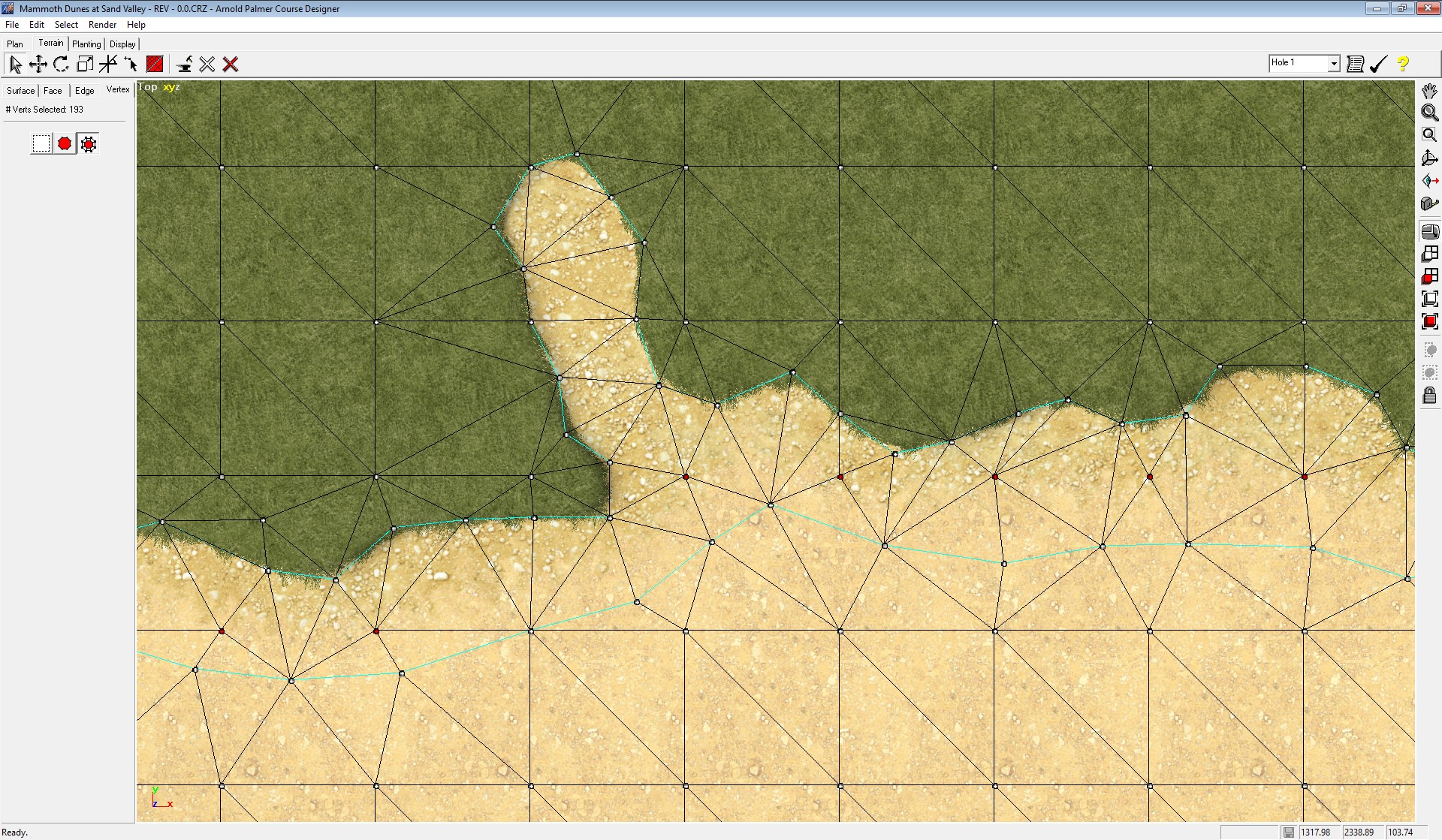
- MD.jpg (740.26 KiB) Viewed 19678 times
My advice would be to stick to using extrusions to create the pairs of aligned verts for a seam blend. That is the only geometry that gives me file stability.
I mapped the right side dune of hole #1 with a couple seam blends to show how I would do it. You likely have 2 options, stick with the bloated 500 MB file that might continue to work, or redo the seam blends differently on the small course file.
https://drive.google.com/drive/folders/ ... sp=sharing